LensNote
Can ChatGPT Transcribe Audio? Uploads, Record Mode, and Limits
Yes, on paid plans. What ChatGPT can transcribe in 2026, how to do it, the file and length limits, and when a dedicated transcription tool is the better fit.
Yes — on paid plans. Since October 2026, ChatGPT accepts audio file uploads of up to 512 MB and can return a transcript, a summary, or structured notes. Free accounts can't upload audio. Separately, Record mode in the ChatGPT macOS app transcribes live recordings of up to 4 hours.
| Audio uploads | Record mode | |
|---|---|---|
| Plans | Paid ChatGPT plans and workspaces | Paid plans, macOS desktop app |
| Input | WAV, MP3, OGG, FLAC, AAC, M4A, PCM, audio-only WebM or MP4 | Your microphone and system audio |
| Limit | 512 MB per file; very long files may time out | 4 hours per session |
| Speakers | Identification "may be unreliable" | Labeled Speaker 1, Speaker 2; can be renamed |
All details in this post come from OpenAI's help articles on uploading files and audio and ChatGPT Record, as of October 2026. Features change often, so check those pages for the latest.
Can ChatGPT transcribe audio files?
ChatGPT audio transcription is a feature of paid plans: ChatGPT can transcribe audio files attached to a conversation. According to OpenAI's release notes, audio uploads arrived on October 6, 2026. Before then, the usual answer was that ChatGPT couldn't transcribe files, and you needed OpenAI's separate Whisper API.
Supported formats are WAV, MP3/MPEG, OGG/OGA, FLAC, AAC, M4A, PCM, and audio-only WebM or MP4, up to 512 MB per file. The file must contain a valid audio stream. Video files are not accepted, even with sound.
Beyond a plain transcript, ChatGPT can:
- Summarize the recording.
- List decisions and next steps from a meeting.
- Pull out quotes from an interview or lecture.
- Answer questions such as "What did they say about the deadline?"
OpenAI notes that availability can vary by workspace settings, region, app version, and model, so a feature missing in one account may appear in another.
How do you get ChatGPT to transcribe audio?
Transcribing audio in ChatGPT takes three steps on a paid plan such as ChatGPT Plus, Pro, or Business:
- Attach the file to a new conversation with the attachment button.
- Say what you want, for example: "Transcribe this recording. Label each speaker, and start a new paragraph when the speaker changes."
- Review the result, then ask follow-up questions or request a different format, such as a meeting recap or an email draft.
To record instead of uploading, use Record at the bottom of a chat in the ChatGPT macOS desktop app. Step 1 is granting microphone and system-audio permission the first time. ChatGPT then transcribes live while you talk, with a timer and a pause button. Finally, selecting Send uploads the transcript and generates notes. For example, a 30-minute team meeting recorded with Record mode arrives in the chat as a canvas of notes, which ChatGPT can turn into an email or a project plan.
How many minutes of audio can ChatGPT transcribe?
ChatGPT's audio upload limit is a file size, not a length: up to 512 MB per file, according to OpenAI. How many minutes fit depends on the format. A compressed MP3 at 128 kbps uses about 1 MB per minute, so 512 MB holds several hours of speech, while uncompressed WAV at CD quality uses about 10 MB per minute, or under an hour.
Length still matters. OpenAI says longer recordings may be processed in smaller sections when Data Analysis is available, processing is best-effort, and very long recordings may time out. Record mode has a clear cap of 4 hours (240 minutes) per session; at the limit, recording stops automatically and generates notes.
In practice, for a two-hour lecture or a long interview, a compressed MP3 or M4A file is the most reliable choice. If a long file times out, split the recording into 30- or 60-minute parts with a tool like ffmpeg or Audacity, and transcribe the parts one at a time.
Is ChatGPT good at transcribing audio?
ChatGPT transcription is good enough for many everyday recordings, and OpenAI is careful about the limits. According to the OpenAI help center, transcripts "may contain errors", "speaker identification may be unreliable", and performance "may vary across languages". Record mode "works best in English today".
In practice, three checks follow from those warnings:
- Check names, numbers, and technical terms against the recording before you share or quote a transcript.
- Don't rely on speaker labels for anything important, such as attributing quotes in a journalism interview or user-research session.
- Expect more errors with non-English speech, heavy accents, crosstalk, or a poor microphone.
For example, a lecture on organic chemistry will contain compound names a general-purpose model may mishear, so skim the transcript with the slides open. If accuracy matters, budget review time; the same holds for every transcription tool, including dedicated ones like Otter, Rev, or LensNote.
Can ChatGPT transcribe audio from a video?
ChatGPT can't transcribe a video file directly: OpenAI states WebM and MP4 files identified as video are not supported by audio uploads. The audio has to be extracted first.
With ffmpeg, a free command-line tool for macOS, Windows, and Linux, one command saves the soundtrack of a video as an M4A file of about 1 MB per minute:
ffmpeg -i lecture.mp4 -vn -c:a aac -b:a 128k lecture.m4a
Then upload the M4A file to ChatGPT. Keep in mind what the audio leaves out: anything shown on screen, such as slides, code, charts, or diagrams. For lectures and screen-share meetings, the screen is often the most important part. For example, "as you can see on this slide" in a transcript points to content no audio file contains. Tools working from the video itself, such as LensNote, keep the slides and match each one to the transcript.
Can ChatGPT transcribe audio for free?
ChatGPT can't transcribe audio files for free: audio uploads are not available on the Free plan, according to OpenAI's help center. Record mode also requires a paid plan.
Free users can still use voice conversations, but that is talking to ChatGPT, not transcribing a recording. If you already have a transcript from somewhere else, you can paste the text into a free account and ask for a summary or notes, within the length of a single conversation.
When is a dedicated transcription tool a better fit?
A dedicated transcription tool is a better fit when recordings are long, recurring, or visual. ChatGPT handles a one-off file well, but a conversation is a poor home for a library of every lecture in a 12-week course, or for recordings where the screen matters.
LensNote is built for those cases, with a 14-day free trial of 180 processing minutes and Pro at $30 per month:
- Audio recordings become a transcript with speaker labels and clickable timestamps, a summary with key takeaways and action items, and a one-page summary image you can share.
- Video recordings keep every slide, each matched to what was said while it was on screen, plus a structured report.
- Every session stays in your library, organized in folders, with read-only share links.
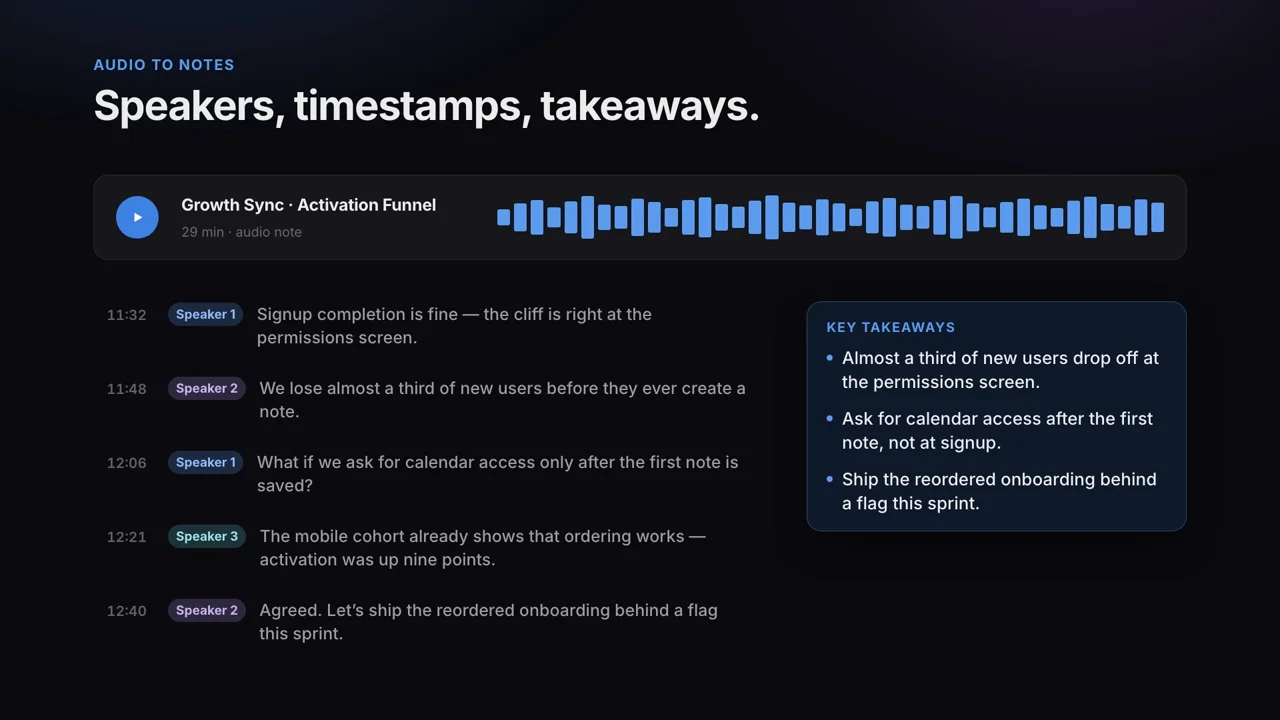
The two also work together: export the LensNote transcript as a text file and ask ChatGPT follow-up questions about it. See audio to notes for formats and limits.
Frequently asked questions
Can ChatGPT transcribe MP3 files?
Yes, on paid plans. ChatGPT accepts MP3 uploads along with WAV, M4A, AAC, FLAC, OGG, PCM, and audio-only WebM or MP4, up to 512 MB per file. Audio uploads are not available on the Free plan.
How long can an audio file be for ChatGPT?
The upload limit is 512 MB per file rather than a number of minutes. OpenAI says very long recordings may time out. Record mode in the macOS app is limited to 4 hours per session.
Can ChatGPT transcribe audio in different languages?
Yes, but OpenAI says audio understanding and transcription performance may vary across languages, and that Record mode works best in English. Review non-English transcripts carefully, especially names and numbers.
Does ChatGPT label speakers in a transcript?
Record mode labels speakers as Speaker 1, Speaker 2, and so on, and you can rename them. For uploaded audio, OpenAI warns that speaker identification may be unreliable.
Can ChatGPT transcribe a video?
Not directly. Video files are not accepted by audio uploads, so extract the audio first, for example with ffmpeg, and upload the audio file. Anything shown on screen is lost in the process.