LensNote
How to Take Lecture Notes: 5 Methods That Actually Work
Taking notes from a lecture is about capturing structure, not sentences. Five proven methods, when to use each, and how to review before an exam.
The best way to take notes from a lecture is to capture structure, not sentences: write the main point of each slide or idea, the lecturer's explanation in your own words, and one open question — then review the notes within a day. Every method below is a different way of doing exactly that.
| Method | Best for | What you write during class |
|---|---|---|
| Cornell | Courses with weekly quizzes | Notes on the right, cue questions on the left, a summary at the bottom |
| Outline | Well-structured, fast lectures | Indented headings and sub-points |
| Slide + explanation | Slide-based lectures | One line per slide, plus the reasoning behind it |
| Mapping | Concept-heavy subjects | A diagram of ideas and links |
| Record and review | Dense or technical lectures | Almost nothing — you process the recording afterwards |
What makes lecture notes useful?
Useful lecture notes are notes you can study from three weeks later, without the lecture still fresh in your head. Learning centers at universities such as UNC Chapel Hill and Stanford give the same core advice: be selective, use a structure, and review soon after class.
In practice, three habits separate notes worth keeping from notes nobody rereads:
- First, structure. Headings and groupings show how ideas relate. A flat list of facts is hard to revise from.
- Second, your own words. Paraphrasing forces you to process each idea while the lecturer's explanation is still in front of you.
- Finally, open questions. Marking what you didn't understand tells you exactly what to look up, ask in office hours, or re-watch.
For example, a 50-minute biology lecture might yield two pages of notes: six headings, a dozen key points in your own words, and three questions for the next tutorial. No single method suits every course, so pick the one matching how the lecture is delivered.
Method 1: The Cornell method
The Cornell method is a page layout for notes, developed by Walter Pauk at Cornell University in the 1950s and described in his book How to Study in College. Each page is split into three areas:
- Notes (the large right column, about two-thirds of the page) — what you write during the lecture.
- Cues (a narrow left column) — questions or keywords you add after class, one per idea.
- Summary (a strip at the bottom) — two or three sentences on the whole page.
The cue column does the real work. When you revise, cover the notes, read each cue question, and answer from memory. The page becomes a self-test, with no flashcards to make. For example, next to a paragraph on supply curves, the cue might read "Why does supply slope upward?" Cornell works especially well in courses with weekly quizzes, because cue questions tend to resemble the questions on the quiz. A ruled A4 or letter page with a 2.5-inch left margin is all you need.
Method 2: The outline method
The outline method is a way of organizing notes as indented headings: main topics at the left margin, sub-points one level in, and details further in. Most lecturers already structure material as topics and sub-topics, so an outline is fast to write when a lecture is well organized.
For example, a history lecture on the causes of World War I might produce four top-level headings (militarism, alliances, imperialism, nationalism), each with two or three indented points and a date or name underneath.
Outlines are easy to scan and easy to turn into a study guide. The weakness is the assumption of a clean hierarchy. When a lecturer jumps between topics, returns to an earlier point, or relies on diagrams, an outline gets messy quickly.
Tip 1: leave blank lines between sections, so a returning topic has room to grow. Tip 2: in Google Docs, Microsoft Word, or Notion, use real heading levels, and the outline becomes a clickable table of contents.
Method 3: The slide + explanation method
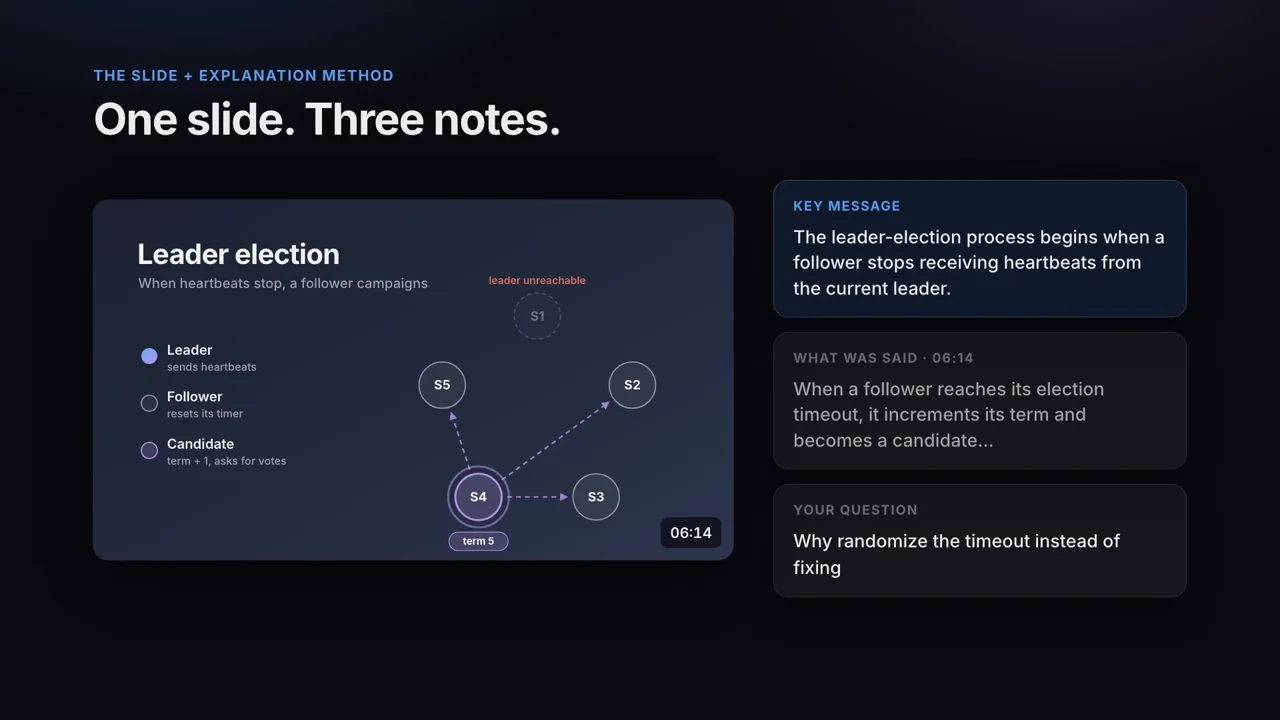
The slide + explanation method is a note-taking method built for the most common kind of lecture in 2026: one with slides. The slides already give you the outline, so copying bullet points is wasted effort. Instead, for each slide you write three things:
- The key message — one sentence on what the slide is trying to teach.
- The explanation — the example or reasoning the lecturer gave, which is not on the slide.
- Your question — anything still unclear.
For example, on a computer science slide titled "Leader election", the key message might be "A follower starts an election when heartbeats stop", the explanation "timeouts are randomized, so two followers rarely start at once", and the question "What happens if two candidates tie?". A 40-slide deck done this way becomes a study guide you can review in about 15 minutes.
If your lecturer shares the deck, write directly in the speaker notes of each slide. If they don't, you can recover the slides from a lecture recording afterwards — see how to extract slides from a video.
Method 4: The mapping method
The mapping method is a way of drawing notes as a diagram: a central topic, branches for sub-topics, and lines between related ideas. Mapping suits subjects where relationships matter more than sequence, such as biology pathways, the causes and effects in a history module, or the themes of a novel.
For example, a map of cellular respiration might put "ATP" in the center, with branches for glycolysis, the Krebs cycle, and the electron transport chain, each labeled with where the step happens and what goes in and out.
Maps are excellent for revision, because a whole topic fits on one page. Drawing one live is slow, though, and keeping the page tidy is hard when a lecture moves fast. In practice, many students take outline or slide notes during class and draw the map afterwards. Turning linear notes into a map is itself an active-recall exercise, and one of the most effective ways to study. Apps like Miro, Xmind, or a sheet of A3 paper all work.
Method 5: The record-and-review method
The record-and-review method means listening closely during the lecture and doing the note-taking afterwards, from a recording. The method works best for dense, technical, or fast lectures, where writing would mean missing the explanation.
Two warnings first. Check your course policy, because many schools require the instructor's permission to record. Additionally, a recording only helps when you process the file; a folder of unwatched lectures is not notes. Ten weeks of a twice-weekly 90-minute course is 30 hours of video.
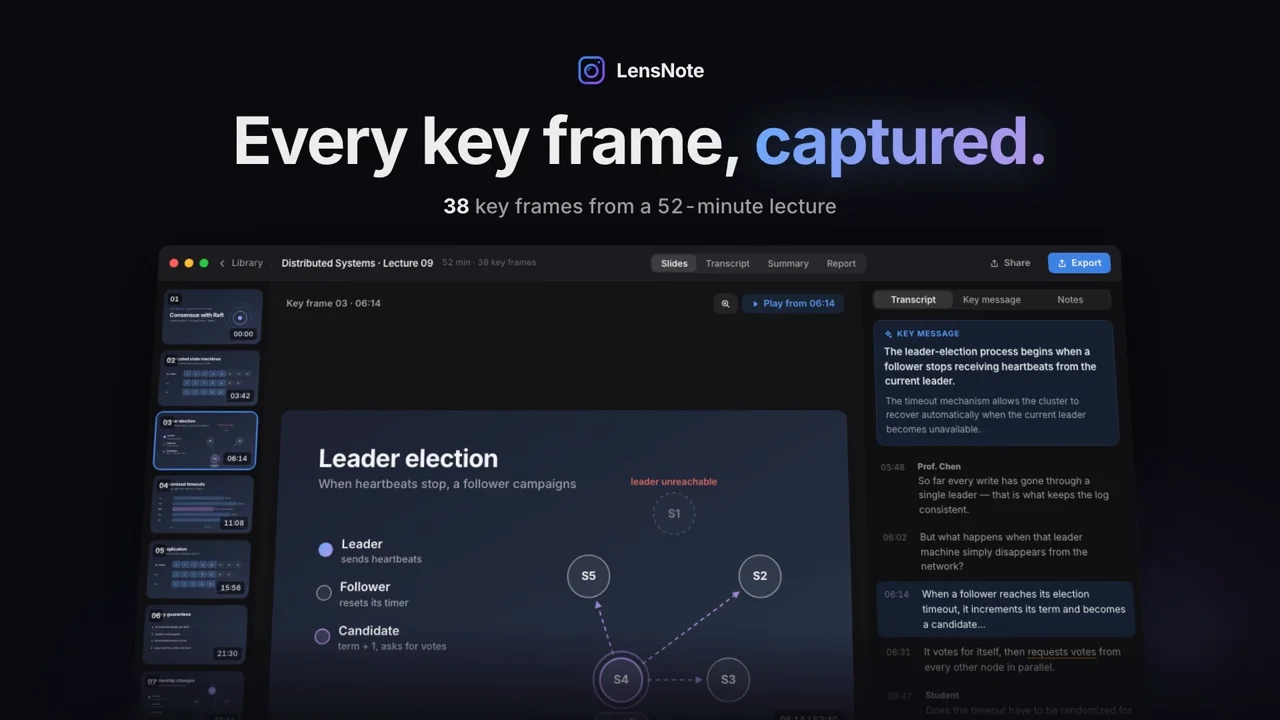
Processing is where software can do the heavy lifting. With an AI lecture note taker like LensNote, the recording becomes notes automatically: each slide is captured once, lined up with what was said, and given a key message. Your review then starts from structured, slide-by-slide notes instead of a 90-minute video. For example, the free trial's 180 processing minutes cover two full 90-minute lectures, and Pro's 1,200 minutes a month cover about thirteen.
What are the 5 R's of note-taking?
The 5 R's of note-taking are the five steps of the Cornell system described by Walter Pauk: Record, Reduce, Recite, Reflect, and Review.
- Record — during the lecture, write the main ideas in the notes column.
- Reduce — after class, condense the notes into cue questions and keywords in the left column.
- Recite — cover the notes and answer each cue from memory, out loud or on paper.
- Reflect — ask how the ideas connect to the rest of the course and to what you already know.
- Review — return to the notes regularly, a few minutes at a time, rather than cramming the night before the exam.
The 5 R's apply to any method in this guide, not only Cornell. Step 1 creates a record of the lecture; steps 2 to 5 turn the record into something you remember. For example, ten minutes of Reduce and Recite on the evening after a lecture usually beats two hours of re-reading in exam week.
Should you take lecture notes on a laptop or by hand?
Taking lecture notes on a laptop is faster, while handwriting tends to force more summarizing. A well-known 2014 study, The Pen Is Mightier Than the Keyboard by Pam Mueller and Daniel Oppenheimer in Psychological Science, found students who typed tended to transcribe lectures word for word and did worse on conceptual questions. A replication by Morehead, Dunlosky, and Rawson (2019) in Educational Psychology Review found the differences smaller and less consistent than first reported.
The practical takeaway is about behavior more than the device. Whichever you use, don't transcribe: summarize in your own words. For example, "Supply rises with price because producers earn more per unit" is a better note than the lecturer's full sentence. If you type, turn off notifications and keep only your notes app open. If you handwrite, photograph each page after class so the notes are searchable in an app like Apple Notes or Google Keep.
How should you review lecture notes before an exam?
Reviewing lecture notes means testing yourself on the notes, not re-reading them. Re-reading feels productive but mostly builds familiarity; answering questions from memory builds recall, which is what an exam measures. A simple three-step routine:
- Within a day of the lecture, spend ten minutes filling gaps and writing your open questions.
- Each week, cover your notes and answer the cue questions or key messages from memory. Mark anything you miss.
- Before the exam, focus on the marked items, and re-watch only those parts of the lecture.
For example, a 12-week course reviewed this way needs about ten minutes per lecture each week, instead of a week of cramming at the end. Additionally, if you recorded the lecture, timestamped notes make step 3 fast: each marked item leads straight to the right minute. See how to take notes from a video for a workflow built around timestamps.
Frequently asked questions
What is the best way to take notes from lectures?
Capture structure, not sentences. Write the main point of each slide or idea, the lecturer's explanation in your own words, and one open question, then review within a day. The Cornell, outline, and slide + explanation methods all follow this rule.
What are the 5 R's of note-taking?
Record, Reduce, Recite, Reflect, and Review. They are the five steps of the Cornell note-taking system: write during the lecture, condense into cue questions afterwards, test yourself, connect the ideas, and review regularly.
What is an app that can take notes from lectures?
LensNote is a lecture note taker that turns a recorded or screen-captured lecture into notes. It saves each slide once, matches it to what was said, and writes a key message for every slide. You can export the result as PDF, Word, or PPTX.
Is it good to take notes during lectures?
Yes, as long as you summarize instead of transcribing. Writing key points in your own words keeps you engaged. For very fast or technical lectures, it can be better to listen closely and take notes afterwards from a recording.
How do you take notes when the lecturer talks too fast?
Write keywords and leave gaps instead of full sentences, and mark the time when you fall behind. Fill the gaps right after class from the slides, a classmate, or a recording — with the lecturer's permission.